Best Photoroom Alternatives In 2025

If you are asked to mention five photo editing tools, Photoroom will probably make it to the list. With over 200 million downloads on playstore, the platform has no doubt captured the attention of many business owners, photographers, and content creators. However, judging from multiple complaints on Reddit, and Trustpilot, Photoroom fails to meet up with most users' needs and expectations. The constant lags, low-quality image generation, poor customer service, and lack of transparency make it less practical for real-time use, even though it has a large market share.
The good news is Photoroom isn't the only option in the market. There are several alternatives online that provide similar and better outputs, like Photoroom, without the cons involved.
Before we delve into the top 5 Photoroom alternatives that are available in the market, let's see the reasons why Photoroom may be a bad option for you, especially if you run an e-commerce brand.
Why Photoroom Doesn’t Work Well for eCommerce Brands
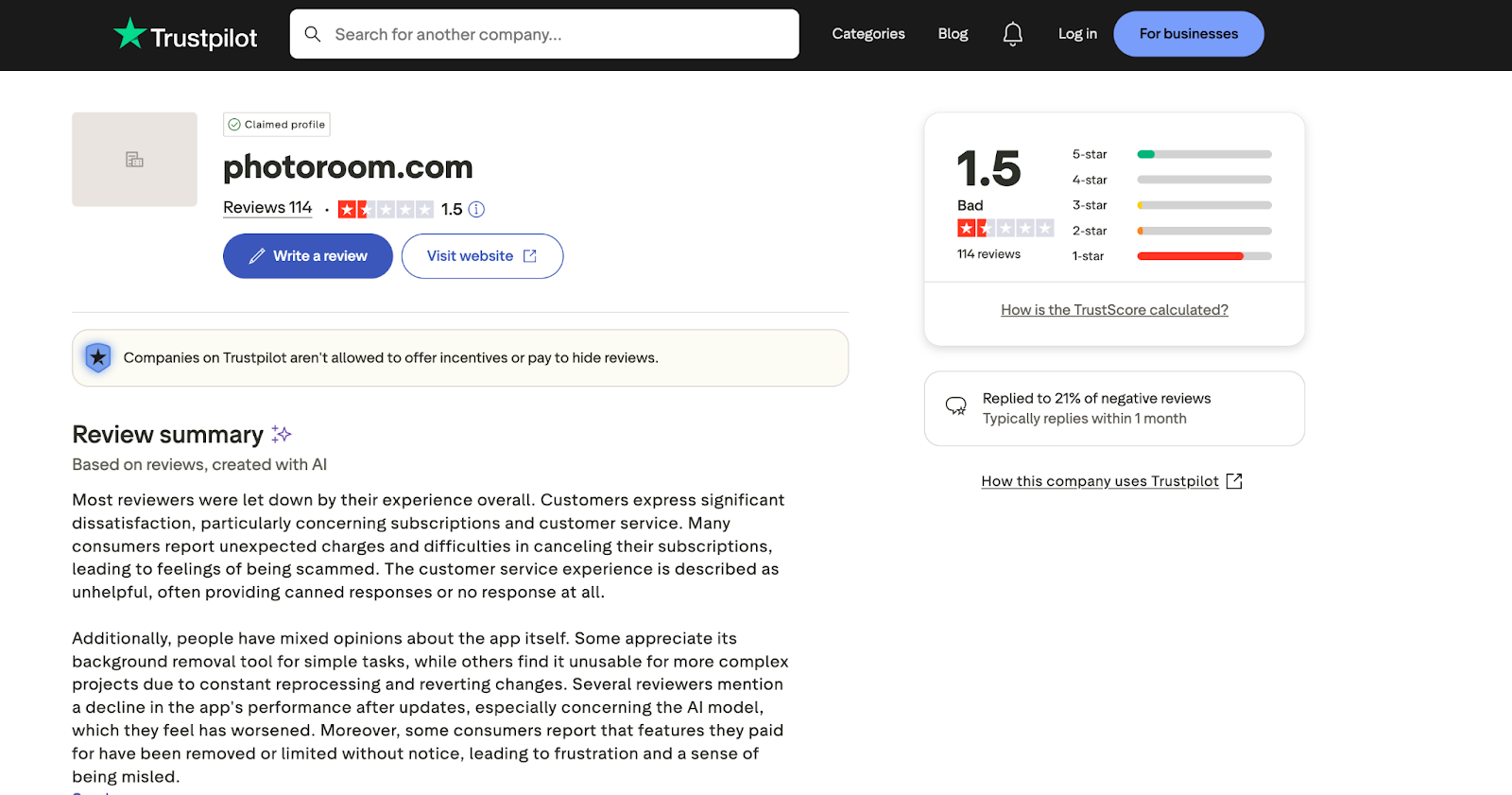
Photoroom is a powerful photo editing tool. However, it lags in certain areas that make it difficult to integrate into a fast-growing business. Some of the reasons why Photoroom may be a potentially bad option for you include:
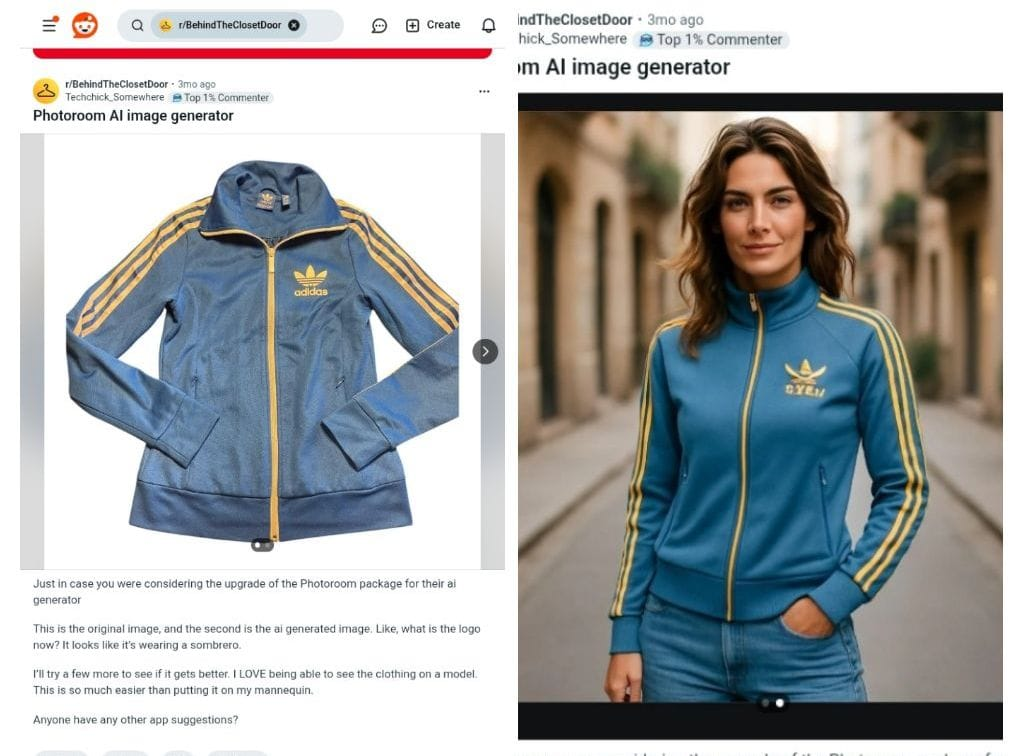
- Distorted Product Label: When used to edit your product image, Photoroom will distort your product label, change your brand logo, and sometimes add some alien text. This is one of the reasons why it might not be ideal for e-commerce brands.
- Frequent System Crashes: Multiple users on Trustpilot complain of system glitches and crashes while working. This is unscalable for brands that require multiple content outputs daily.
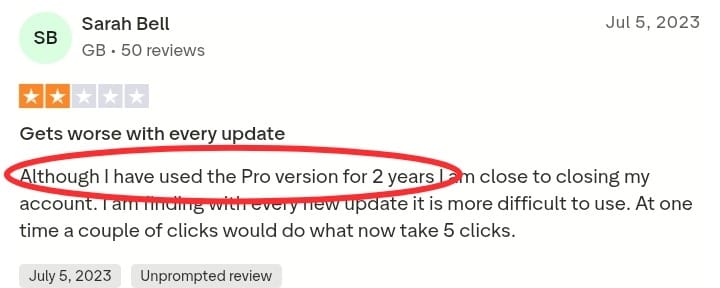
- Low-quality Image Outputs: Your brand visuals influence the public's perception of your brand, products, and ultimately their purchasing decisions. But Photoroom fails at generating high-quality images that you can use for marketing and advertising purposes.
- Limited AI Capability: Photoroom is limited in certain AI tasks like character generation, AI video generation, custom-trained models, etc. This keeps you limited to creating content that can engage and convert your audience.
- Poor Customer Service: A common complaint on Trustpilot is Photoroom's unresponsive customer support to issues and complaints. This can be frustrating when you need immediate help in carrying out important tasks.
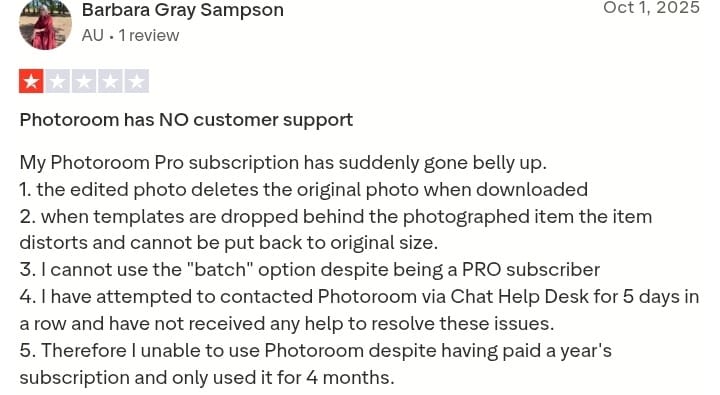
- Feature Gating and Removal: Several users report having certain features removed from the paid plans after they make payment. Some of these features are their most-needed tools, but they end up getting disappointed when they discover that they are no longer included in the subscription package.
Best 5 Alternatives To Photoroom In 2025
Pikes AI

Pikes is a Gen-AI platform that provides a full-stack content creation tool kit for e-commerce brand owners and product marketers. It is designed for brand founders who value quality and creativity. The platform integrates tools like product photography, text-to-image, model training, image editing, video generation, and UGC creation to generate studio-quality visuals for commercial use. Pikes also has a unique AI model that ensures consistency in text, label, and style across all generated content.
Apart from the free trial option for new users, Pikes offers three pricing plans: Starter, Growth, and Pro.
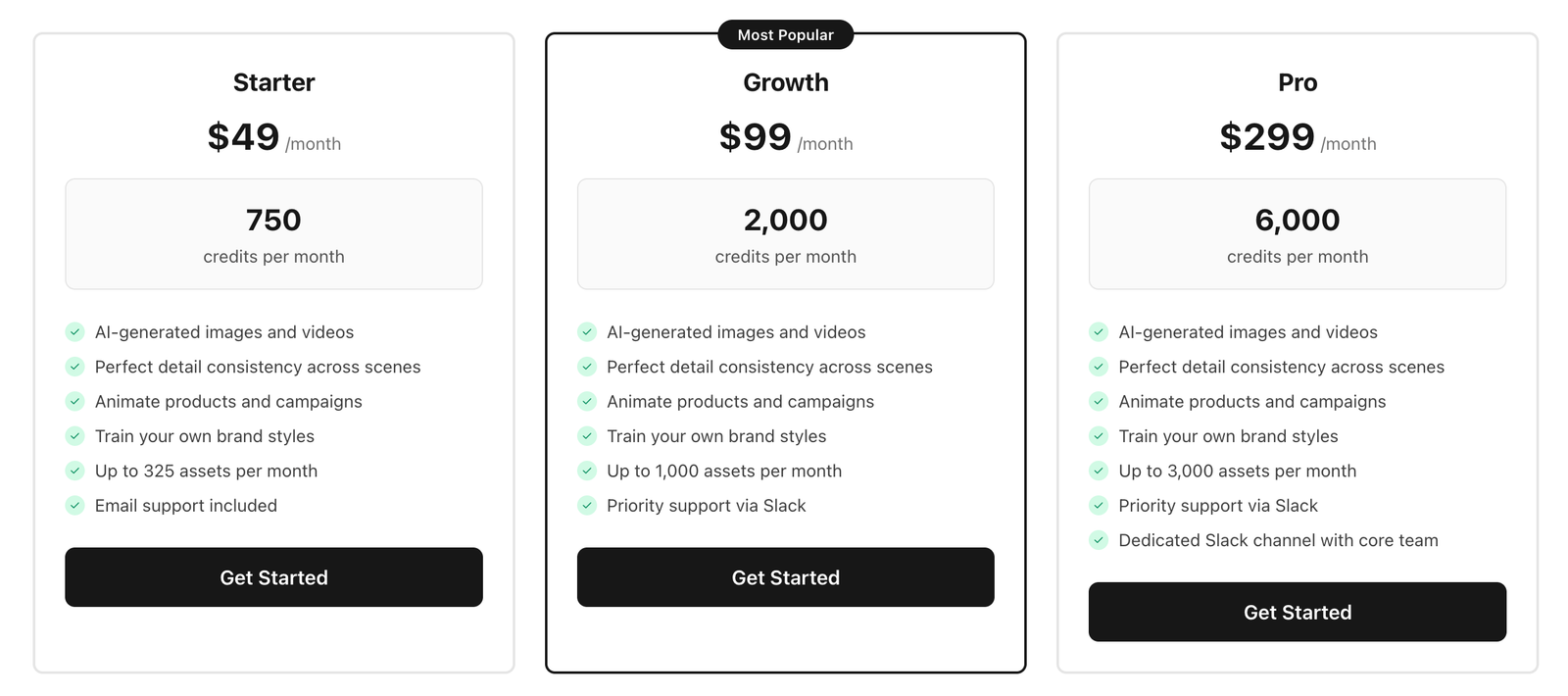
Pike's ability to generate hyper-realistic product images with perfect lighting, creative angles, and perfect product consistency makes it one of the best Photoroom alternatives for eCommerce brands.
Advantages
- Advanced, unique AI model for all content generation tasks, which includes image editing, product image animation, text to image, custom-model training, UGC creation, etc.
- Zero distortion in product text, labels, and logos (no alien text or image on your product label!).
- Template and discover page to find inspiration and never run out of ideas.
- Human-centric customer service team to provide personalized support to your needs and complaints via Email.
- Image resize feature to help you fit every image into any channel (Amazon, Walmart, TikTok, Meta, etc.).
- Easy to cancel your subscription or opt out of the free trial plan if you want to move on.
PicsArt
PicsArt is an AI-powered platform used for image editing and video generation. One of its most loved features is its precision-level background removal and replacement tool. The AI image generation ability, combined with the background removal tool, allows business owners to create multiple visually appealing images within seconds. It also integrates basic graphic design tools like logo generation, flyer, and banner maker to help sellers create a strong brand impression on social media.
PicsArt offers two categories of packages: Makers (small/solo business owners) and Marketers.
The Maker package is categorized into three tiers—Free, Plus, and Pro.
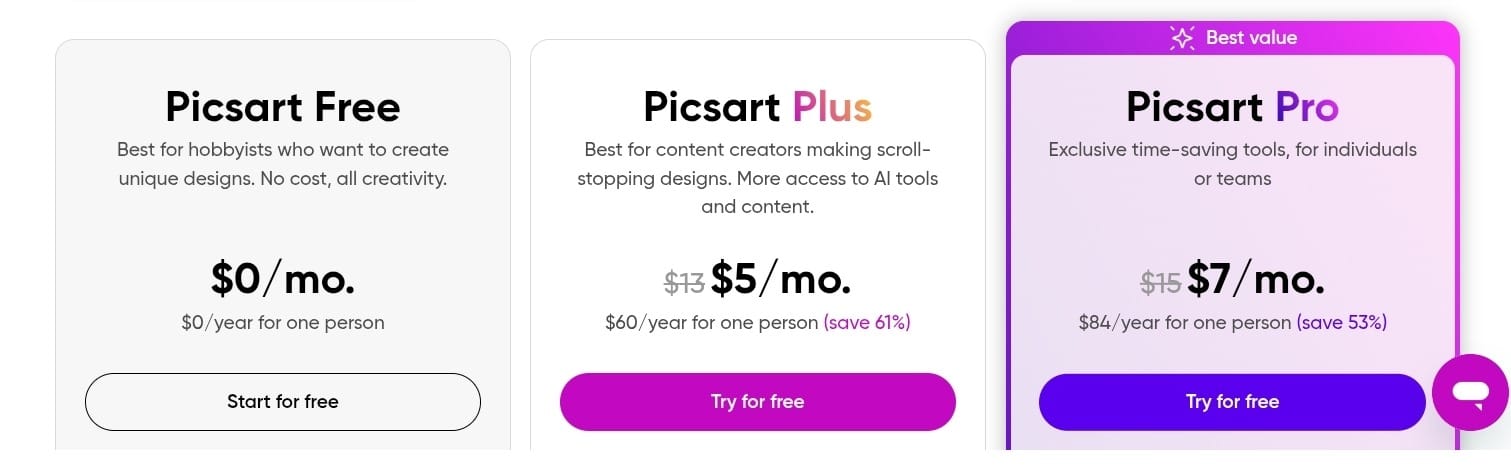
The Marketer Package includes the AdMaker Lite plan, AdMaker Max plan, and the Custom enterprise plan.
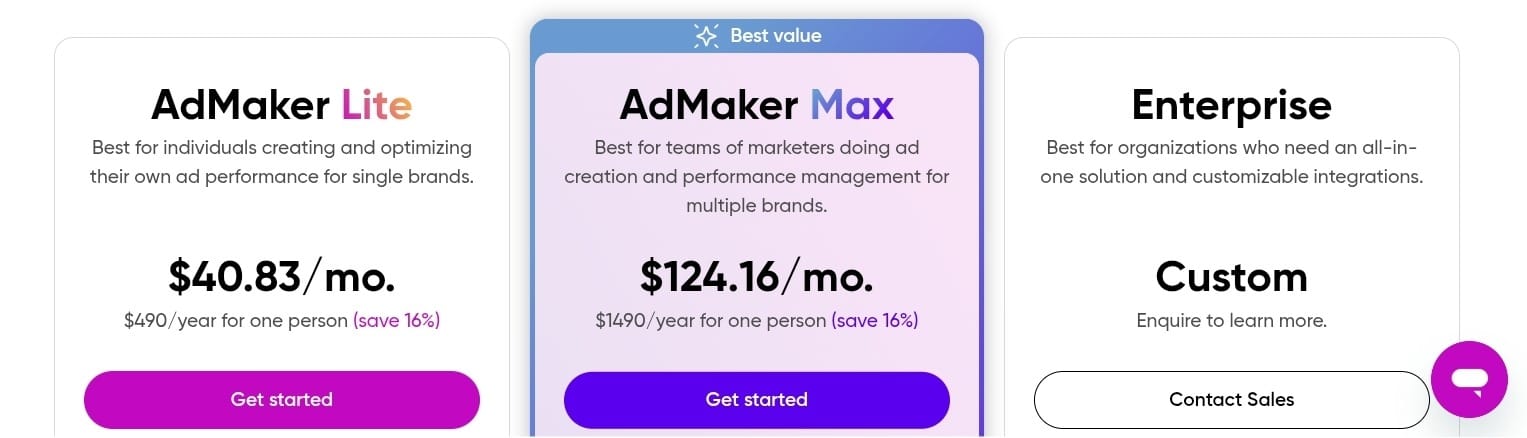
Overall, PicsArt's simple interface, photo editing suite, and competitive pricing make it one of the top Photoroom alternatives in the market.
Advantages
- Batch editing to save time and energy
- Flexible and affordable pricing package for small and large business owners
- Easy to use—no learning curve involved
- Image editing and graphic design tools in one suite
Disadvantages
- Low-quality AI images: While PicsArt is great at creating backgrounds and backdrops, it is incapable of generating creative product images and visually appealing lifestyle photos.
- “Free” plan isn't free: Multiple users on Trustpilot report being charged a full amount after opting for the free plan. Even after requesting a refund, most victims mention that they were unable to get one.
- Poor cancellation policy: We all have the freedom of choice, and that includes cancelling a subscription when we realize that it cannot serve us the way we want. PicsArt has poor cancellation flexibility, leading to multiple chargebacks from unsatisfied users.
- Poor customer service: Although PicsArt has an email support system for customer complaints and an AI chatbot for quick answers to common questions, many real-time users report the customer service team being unresponsive. Instead, they get spammy emails that offer no useful support.
Snapseed
Snapseed is a photo editing software that was first developed by Nil software and later acquired by Google. The platform has over 29 tools and filters to transform RAW and JPG files into realistic, visually-appealing photos. Snapseed works on all devices, including Android, IOS, Windows, and Mac, making it applicable while on the move or for heavy edits. Editing features like white balance, healing, brush, vignette, details, and perspective are intuitive to use by both amateur and professional photographers.
Snapseed's intuitive UI, coupled with free access to some of Photoroom's capabilities, easily makes it a good alternative to Photoroom.
Advantages
- Free to use: Snapseed is free to use without any hidden subscription, exclusive features, or in-app purchases.
- Supports 30+ languages worldwide: Snapseed is configured in 34 languages, including Chinese, Arabic, French, and Spanish.
- Beginner and expert-friendly: The comprehensive toolkit makes it a handy software for expert photographers, while the simple filter options make it simple for everyday photo lovers.
- Optimized for mobile: Snapseed is available on all devices, including Android and iOS.
Disadvantages
- Lacks creative features and Add-ons: Snapseed is great at changing the mood of a photo, but is incapable of replacing backgrounds or adding creative features (texts, graphics, or images). This makes it less practical for product owners and marketers who use storytelling and disruptive visuals to sell their product images.
- No built-in Storage: Snapseed has no storage capacity, so users have to transfer files or save them in a cloud backup to avoid losing them.
- Learning curve for advanced tools: The more powerful features, like curves, selective brushes, etc., require a learning curve to apply them effectively.
- Not optimized for Windows and Mac: Snapseed must be connected to an emulator before it can work on Windows and Mac operating systems.
- Software bugs and glitches: Users commonly report frequent glitches and bugs, causing some features to not work properly.
Pixlr
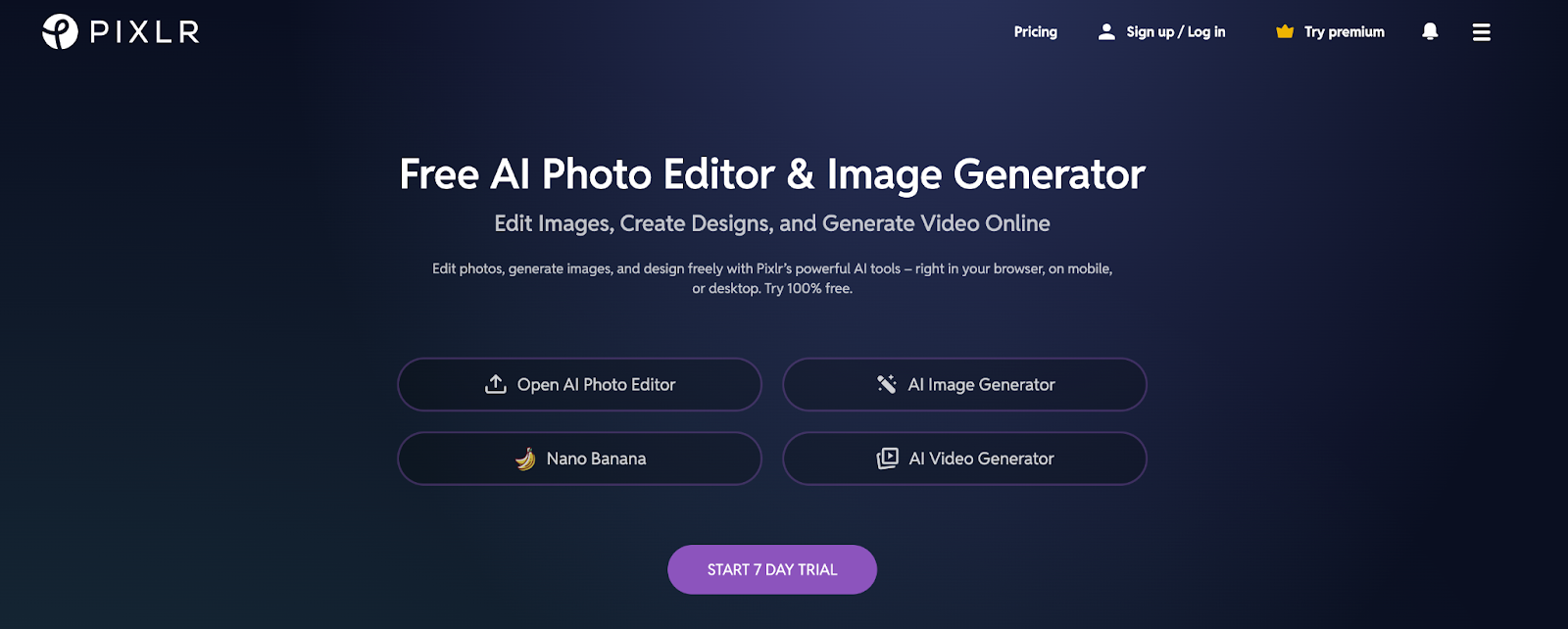
Pixlr is an online photo editing tool used for photo editing, image generation, background removal, and generative fill. What makes Pixlr one of the most popular alternatives to Photoroom is the platform's integration of graphic design tools and its mobile optimization, making it easily accessible on the web. The platform combines photo editing technology with generative AI models to create and edit stunning visuals for personal and commercial use. Features like video generator, AI remove object, AI generative fill, generative expand, and resize image are useful for product owners who want a fresh perspective on their product.
Pixlr has three pricing tiers, namely Plus, Premium, and Team.
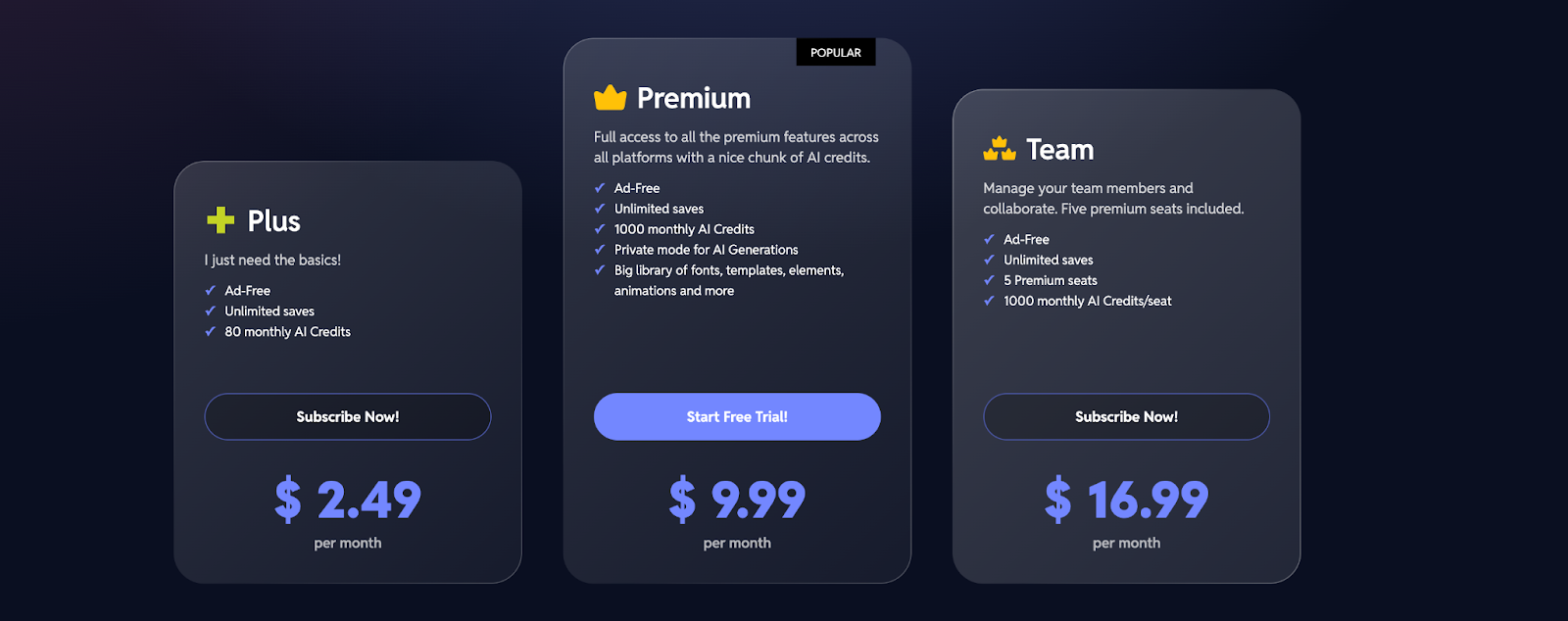
It offers a 7-day trial for new members to test out their platform before committing their money and time.
Advantages
- Cheap pricing: Pixlr's subscription plan starts from as low as $2.49, making it accessible for anyone, irrespective of their budget.
- Supports multiple languages: Available in 30 languages, including Portuguese, Deutsch, Español, and French.
- Simple UI: Pixlr has an incredibly simple user interface that makes it intuitive for both beginner and seasoned professionals.
Disadvantages
- Low-quality AI images: Multiple users on Trustpilot complain of getting awkward results from their prompts, while some get low-quality images that are unusable in real time.
- Deductions after cancellation: Ever had your card charged for a service you stopped using a long time ago? That's what several Pixlr users complain of on Trustpilot.
- No reminder for renewal: Pixlr gives the liberty to opt out of the free trial before it expires, but never sends reminders to do so.
- Intrusive Ads: Editing photos on Pixlr without getting intrusive pop-up ads is a luxury because the platform continually pops up ads even while you're working.
Fotor Photo Editor
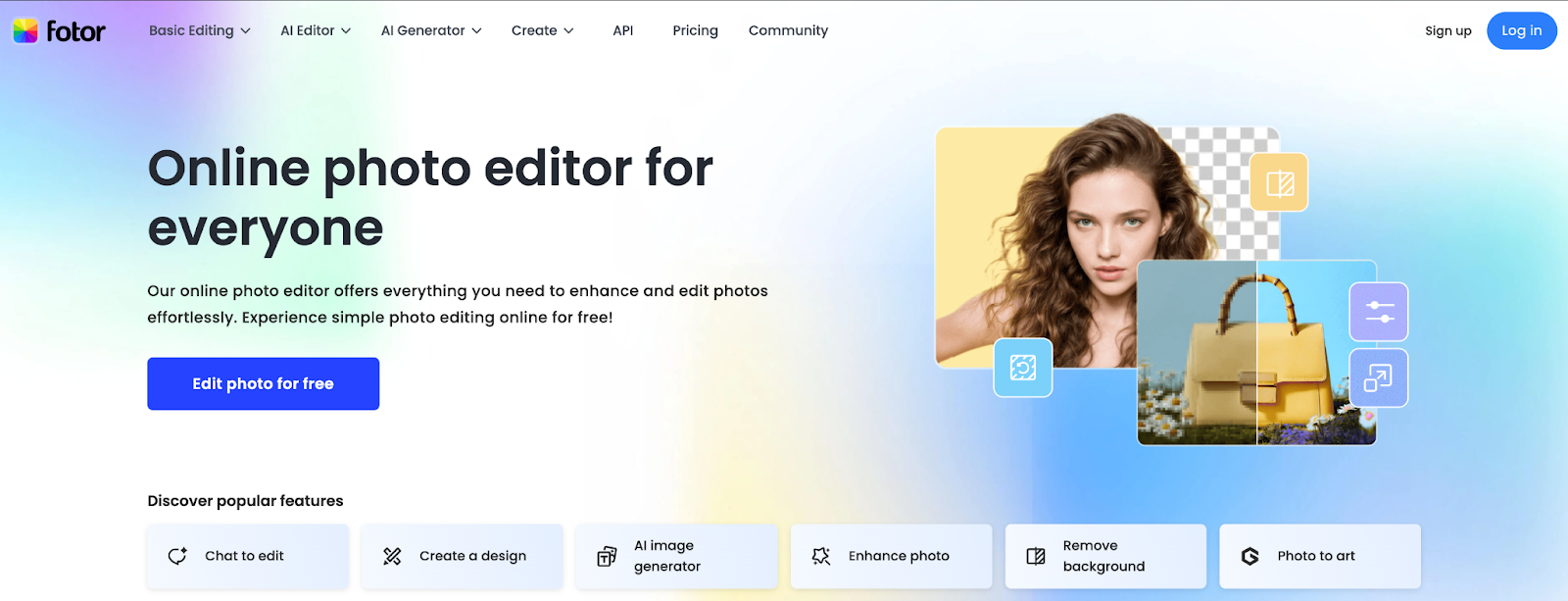
Fotor is another popular alternative to Photoroom that is used for editing photos and images online. The platform's distinctive feature from all other tools listed above is the AI avatar tool that allows you to create unique characters for any use case. Fotor's AI-powered technology also allows it to perform a number of actions, such as photo enhancement, image resize, background removal, text to art, photo to art, etc.
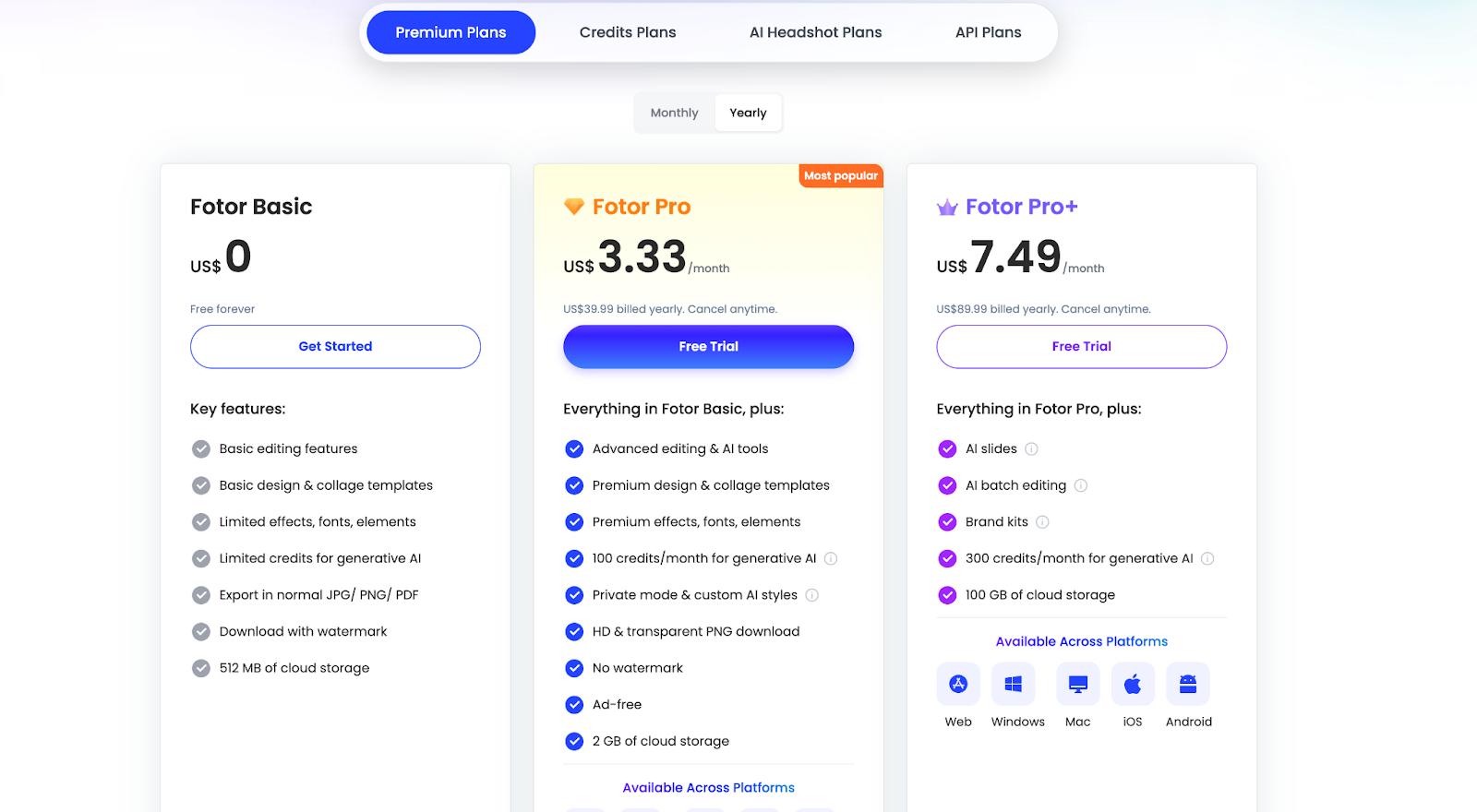
Fotor offers 4 kinds of plans: Premium, Credit, Headshot, and API plans.
Advantages
- Flexible pricing plans: Whether you want to perform a one-time edit or execute a long-term project, Fotor has a flexible pricing plan that helps you pay for only what you use.
- Simple to use: Fotor's simple interface makes navigation and usage seamless, even for first-time users.
- Quality AI generations: Many users on G2 and Trustpilot express their satisfaction with the image and video outputs on the platform.
Disadvantages
- Difficult to cancel subscription: According to reviews on Trustpilot, several users report being unable to cancel their free trial or paid subscriptions.
- Occasional low-quality image generation: Fotor occasionally generates low-quality and mismatched outputs, causing users to waste credits and money.
- Lacks some advanced features: Fotor is limited in some powerful editing features like color grading, layered editing, curve editing, and extensive masking. These editing features are important for transforming raw photos into high-quality images.
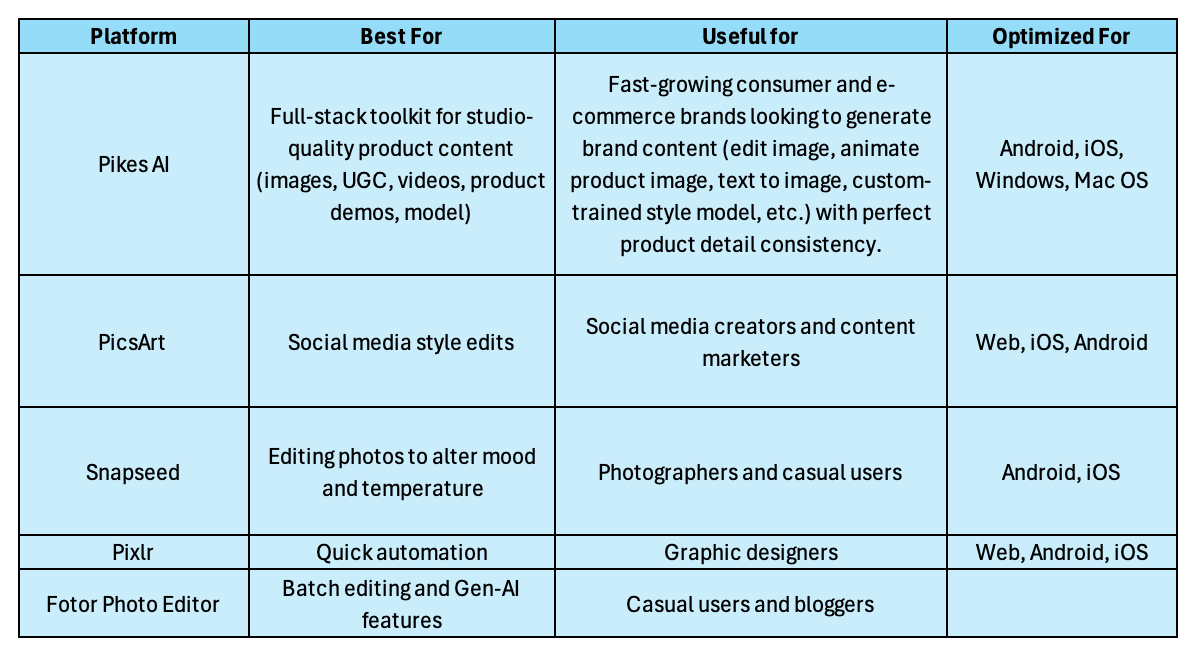
To recap: Quick Selection Guide to Pick the Best Photoroom Alternative