
Amazon Product Photography Guide: Best Practices in 2025

Let’s be honest—Amazon is a fierce marketplace. You could have the best product in your category, but if your photo doesn't catch attention within two seconds, buyers will scroll past it.
Your product images are the heart of your Amazon presence. They are very important, as they are often the first (and sometimes the only) chance you get to convince a shopper to click “Add to Cart.”
For context, Amazon is the biggest e-commerce store in the world, with over $147.977 billion in sales as of 2024. The platform offers thousands of similar products. Since your product image is like your sales pitch, it has to stand out. The quality of product photos can either make people buy on Amazon or pass. You could have a great product, beautiful packaging, and a detailed description, but there would be no sales. Your product image is the culprit here. If it’s not catchy enough to make someone say, “Oh, I want this” within the first three seconds, they’ll scroll past.
So if you’ve been struggling with taking Amazon-worthy product pictures, this guide breaks down everything you need to know about Amazon product photography best practices in 2025. We’ve broken down what works in 2025 and how you can use AI product photography tools to create stunning, Amazon-compliant visuals in minutes instead of weeks.
6 Best Amazon Product Photography Tips in 2025

Camera choice, background, lighting, image format, and product coverage are some of the things to be mindful of when taking Amazon product photos. Since Amazon is a strict platform, these tips below aren’t just nice-to-dos; they are necessary. Let's look at them in detail.
Get a Good Camera
You need a sharp camera that screams “professional”. You can get a DSLR or any camera with a good lens. Thankfully, you may not need this since the iPhones and Google Pixels that we now have can get the job done.
If you have any of these devices, apply the recommended lighting and background setup, and you’re good to go. You also need to make sure that only the product shows in the image, nothing else.
Use a White Background
You must use a plain white background when taking images of your Amazon products. This gives the product a clear and professional look that immediately draws people in. Using a white background isn’t just a recommendation we’re giving; it’s a strict Amazon requirement. So, even if your favorite or brand color is sky blue, it cannot be the background colour for your Amazon product picture.

The neutrality of a white background also helps customers see the true colors and details of your product without distractions. It’s easier to build trust and avoid returns this way.
On the technical side, your background must have an RGB value of 255, 255, 255. Even a slightly off-white shade would most likely be rejected.
If you’re editing your pictures yourself, use tools like Canva, Pixlr, or Adobe Photoshop to confirm your background colour. Some AI-powered photo editors like Pikes AI can even automatically detect and correct off-white tones to ensure your background meets Amazon’s requirements.
Tripod and Lighting
Lighting and stability are essential parts of Amazon product photography. If your images come out blurry, grainy, or not properly lit, customers will assume it’s low quality even if it isn’t.
You need a tripod so shaky hands don’t ruin the quality of your pictures. It also keeps the shots consistent. And interestingly, you don’t need an expensive tripod to take great pictures. The main thing is to get stability, which even a small, adjustable, but sturdy tripod can provide for you.
Lighting is equally important because it’s like the backbone of great e-commerce product photography. Natural light will always be the best (even video content creators confirm this). You should target early mornings or late afternoons when the light is soft and diffused. But if you’re shooting indoors, you’ll need artificial lights like ring lights and soft box lights. Position your main lights at 45 degrees to the product, and use fill lights to avoid harsh shadows.
In all of this, make sure that you use the same light setup even if you’re shooting the product from different angles. Also, be sure that the lighting isn’t harsh. The moment your images start appearing different is the moment people start having doubts about your product.
Flat Surface
A flat, stable surface is one of the most underrated parts of product photography. You might think it doesn’t matter, but uneven surfaces can ruin a photo that would have been perfect.
When you place your product on a clean and flat surface, you remove unwanted shadows and tilts that can make your product look distorted. Use a white tabletop, foam board, or photo backdrop paper to achieve this. If you do it well, people will even think you took the pictures in a studio.
If your product is reflective (like jewellery, glass, or electronics), try using a matte surface or light-diffusing base to prevent reflections. A plain white acrylic board can also help create that crisp, “floating” look that many of these best-selling Amazon photos have.
Also, flat surfaces are recommended for easier editing. When your product sits neatly on a clean plane, background editing apps and software can easily isolate the product without awkward cutouts or pixel errors.
Take Multiple Angles and Use Lifestyle Shots
One static image won’t do. Customers want to see your product from every possible angle before making a decision. For instance, when you go to a walk-in bag store, you pick up the bag, turn it around, open and close it, check the texture, size, and color. . . your product images should give people the chance to do all this online.
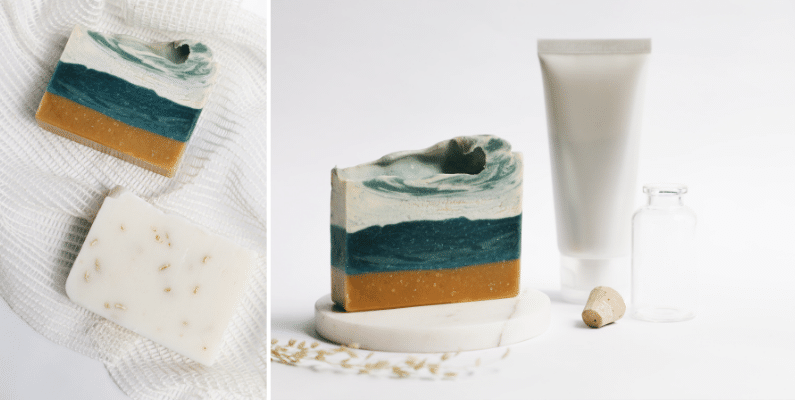
Amazon allows you to upload nine images per product listing (one main image and eight other supporting ones). In the supporting images, include shots that show:
- The front, back, and sides.
- A close-up of textures, labels, or materials.
- If you sell children’s clothing, photograph them flat; no models. You can only use models for adult clothing.
- You can include infographics.
- The product in use (a lifestyle shot).
Lifestyle images, in particular, are very efficient because they help potential buyers imagine how your product fits into their lives. For instance, if you sell cookware, show someone cooking with it. If it’s a tech gadget, show it in a modern workspace. You can achieve this with Pikes AI without needing to get a model or book a photoshoot session.
Follow Amazon’s Technical Standards
Amazon doesn’t play about their image requirements. They want every image across the platform to look clean and consistent. So, beyond your creativity, you need to follow Amazon image requirements and technical guidelines, like:
- Image Resolution and Size: The Amazon product photo dimensions require that your image be at least 1000 pixels on the longest side. However, you can take it further to 2000 pixels or more for high-resolution displays. The size must be 10MB or less.
- Image Format: Amazon accepts formats like JPEG, TIFF, and PNG. JPEG balances file quality and size really well, making it the most preferred format.
- File Name: Use product identification numbers or product identifiers like ASIN, ISBN, UPC when naming the product. This will help to streamline inventory management.
- Product Coverage: The product should occupy up to 85% of the frame, and the main image’s aspect ratio should be 1:1. The supporting images, on the other hand, can have a maximum of 5:1 aspect ratio.
- Avoid adding logos, texts, borders, colour blocks, or watermarks to your main image because Amazon would reject it. These can fly for secondary images.
How to Create Great Amazon-Worthy Pictures on Pikes AI

It’s okay to not have the budget, gadgets, or time to take these product images and still not want to compromise on quality. If this sounds like you, Pikes AI is all you need. With it, you can create those Amazon-worthy pictures and not have to cancel your other appointments or leave a hole in your pocket.
The best part is that Pikes AI costs only $49/month, and you can get up to 325 product pictures for Amazon. Amazing right?

Here’s how to do it:
1. Sign Up and Set Up an Account
Sign up for a Pikes AI account, set it up, and head to the “Products” tab. From there, put in your website link so that the platform can fetch your product images. You can always delete or add new images. Note that link fetching only works for Shopify store. Upload product images directly if you are not on Shopify.
2. Upload Your Base Product Photo
Upload a clean image of your product (if it’s not among the automatically fetched ones); ideally, on a flat white surface with good lighting. The clearer the base image, the better the output.
3. Choose Your Style
Pikes AI lets you pick from different background styles, like plain white for Amazon. You can use the “Consistency” features to apply text consistency and the “Creative” feature to make your image look realistic. You can also add prompts to customize the image the way you want.
4. Make Details Better
You’re allowed to change the color to your preferred one, correct the lighting, etc., to make it more realistic. It ensures that even if your original photo wasn’t perfect, the final version looks professionally shot.
5. Train to Your Style & Model
You can train the platform to easily adapt to your style by uploading 4-20 images and following the on-screen prompts. This will ensure consistency and make your work faster.
Common Amazon Product Photography Mistakes to Avoid
Even with all these tips, it’s possible to still make a few mistakes. These are the ones to watch out for:
- Over-Editing: Don’t raise saturation or brightness to unrealistic levels. Customers can tell, and it leads to returns when they don’t get exactly what they saw.
- Inconsistent Lighting: Every image in your listing should look like it was taken in the same environment.
- Neglecting Scale: Always show your product in a way that communicates its actual size. A simple prop (like a hand or coin) can help.
- Ignoring Packaging: If your packaging adds value, show it. This will enhance perceived quality and trust.
- Not Testing Images: A/B test your photos from time to time. Sometimes, we don’t realise that a small change in angle or brightness can double your click-through and conversion rates.
- Ignoring Mobile-Friendliness: According to Statista, 62.75% of web traffic is from mobile devices. It means that people shop more with their phones, and for this reason, your Amazon product images should be mobile-friendly.
Final Thought
A white background, proper lighting, a stable tripod, right formatting, and great editing are some of the requirements for Amazon product photography. If you stick to these (and the other tips in this article), you’re sure to make more sales from your Amazon listing.
While you’re at it, you may also want to document your setup so that you maintain consistency with all your shoots.
And if you’re short on time, equipment, or money, be sure to leverage AI tools for Amazon product photography. Tools like Pikes AI make it easier to create realistic studio-quality photos from the comfort of your home.
Frequently Asked Questions (FAQs)Can I use AI for Amazon Product Photography?
Yes, you can use efficient and reliable AI tools like Pikes AI to generate Amazon-compliant product images.
What AI Tools Can I Use for Amazon Product Photography?
Pikes AI is the perfect AI tool for Amazon product photography. It is flexible, realistic, sharp, and cost-effective. With Pikes AI, people can’t tell that you didn’t manually take the pictures.
What’s the Best Lighting Setup for Amazon Product Photography?
The best lighting setup for Amazon product photography is natural light. However, you can get a ring light and soft box light for an indoor shoot or just to give extra lighting.
How Can I Take Professional Product Photos for Amazon at Home?
You can take professional product photos for Amazon at home by using a good camera, like a DSLR or an iPhone. You also need sufficient lighting, a sturdy tripod, and good editing.